|
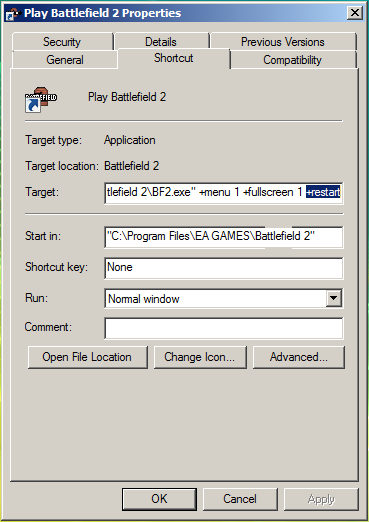
Battlefield 2: skipping the introBattlefield 2 starts with several intros. First, it shows you the EA logo, then the DICE logo, and then finally the cool battle scene. It's fun to watch the first time, but after a few times, it's a bore and really teases your patient. All of the intro movie files (.bik extension) are located in "C:\Program Files\EA GAMES\Battlefield 2\mods\bf2\Movies". Each intro has its own individual file. Content of the "Movies" directory: Dice.bik To disable any of the intros, simply move the individual file into another directory. You can re-enable any intro by moving them back. I simply created a directory called "orginal" and dumped the intros in there. I choose to do away with "Dice.bik", "EA.bik", "Intro.bik", and "Legal.bik". Chieh Cheng cool, da-/*snipah My friend showed me an easier way. You can add "+restart" to the start-up command-line and skip the intro. That's adding it to the "Target:" field of the "Play Battlefield 2" short cut (see screen shot below). Attached Image: Chieh Cheng
Did your message disappear? Read the Forums FAQ. TrackBackTrackBack only accepted from WebSite-X Suite web sites. Do not submit TrackBacks from other sites.
Title: Special Forces - Skipping the Intro Add Comment
Messages, files, and images copyright by respective owners. |
Articles
|
Wiki
287 Users Online
Get Our

|
|
Copyright © 2004 - 2025. All Rights Reserved. |
|

 Related Links
|
Related Links
|