|
 Add Comment
| Add Comment
|
 Related Links
| Related Links
|
 TrackBack TrackBack
 Related Content Related Content
The Right Way to Program Razer Naga Macros for League of Legends
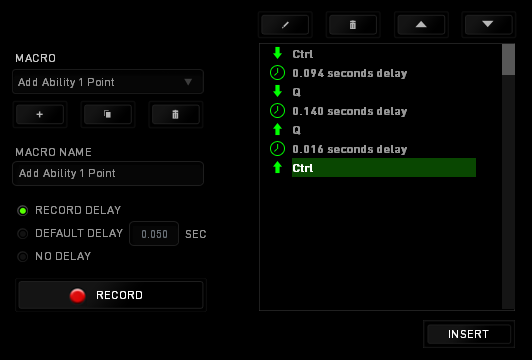
A few days ago I was really excited to get the Razer Naga to use with League of Legends. I had lots of plans, most of them I have already posted in the League of Legends: Perfect Gaming Mouse thread. But basically I want to program button 7 - 10 so that I can use then to increase my ability powers every time I level up. I also want to program mouse button 5 for activating item 6 (healing potions) and mouse button 4 for commanding pet (Annie's big teddy bear). So I used Razer Synapse 2.0 to program the macros for these functions. Then I assigned them to the buttons on the mouse. Funny thing . . . they didn't work. Button 6 on the keypad works just fine, because it defaults to keyboard 6. But none of my macros worked. I scratched my head for days. It turned out that I had recorded those macro without any delay. And League of Legends requires some delay to register the key press. After re-recording the macros with delay (see screen shot below), the macros worked with League of Legends. And I was able to level up my abilities without moving my mouse. Attached Image:
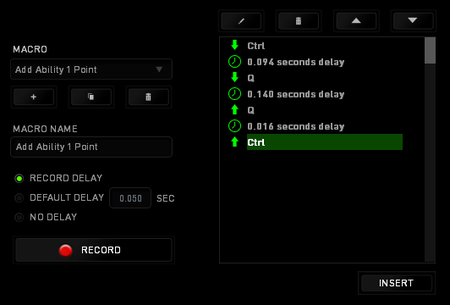
Programming Macro.png FidoMushu
Sat, 28 Jan 2012 11:53:04 +0300
Bro you can do this anyway without moving your mouse just click CTRL + Q,W,E,R depends on which spell u want to level up Antoan
Sun, 29 Jul 2012 16:59:15 +0400
The LOL item interface has change slightly since the original post. The last item was item 6. But the new interface has added totem slot, which is item 4, moving the last item slot to 7. There are also a number of MMO gaming mice, similar to the Razer Naga, on the market with 12 buttons on the side. They are listed in the "Related Links" section below. FidoMushu
Sun, 02 Dec 2018 19:16:57 -0800
Add Comment
|
Related Links
|
TrackBack
Related Content
Did your message disappear? Read the Forums FAQ.
TrackBack only accepted from WebSite-X Suite web sites.
Do not submit TrackBacks from other sites.
 Send Ping |
TrackBack URL
| Send Ping |
TrackBack URL
|
 Spam Control Spam Control
Title: Razer Naga MMOG Laser Gaming Mouse $61.99 Shipped
Weblog: iDealSaving
Excerpt: Razer Naga MMOG Laser Gaming Mouse (RZ01-00280100-R3) for $61.99 with free Super Saver shipping. The Razer Naga is the ultimate Massively Multiplayer Online Gaming mouse that shifts the balance between keyboard and mouse by putting an unprecedented number of in-game commands in one place. A multi-bu . . .
Tracked: Tue, 03 Apr 2012 21:49:59 +0400
- CORSAIR Scimitar Pro RGB - MMO Gaming Mouse - 16,000 DPI Optical Sensor - 12 Programmable Side Buttons - Yellow
 - Amazon User Reviews - Amazon User Reviews
- Elecom gaming mouse M-DUX70BK wired 19 button 2PC simultaneous operation 5000dpi
 - Amazon User Reviews - Amazon User Reviews
- ENHANCE Theorem MOBA MMO Gaming Mouse for PC with 16400 DPI, 19 Programmable Buttons, RGB LED Lighting & Precision Laser Sensor - Built in Memory with 6 Custom Profiles for Competitive Esports
 - Amazon User Reviews - Amazon User Reviews
- HAVIT HV-MS735 MMO Gaming Mouse Wired 12000DPI 19 Programmable Button Optical Sensor Pixart PMW3360
 - Amazon User Reviews - Amazon User Reviews
- Logitech G600 MMO Gaming Mouse, RGB Backlit, 20 Programmable Buttons
 - Amazon User Reviews - Amazon User Reviews
- Razer
- Razer Naga Chroma - Ergonomic RGB MMO Gaming Mouse- 12 Programmable Thumb Buttons & 16,000 Adjustible DPI
 - Amazon User Reviews - Amazon User Reviews
- Razer Naga Epic Chroma MMO Gaming Mouse - 19 Buttons - 8,200 - Wireless
 - Amazon User Reviews - Amazon User Reviews
- Razer Naga MMOG Laser Gaming Mouse (RZ01-00280100-R3)
- Razer Naga Trinity: True 16, 000 5G Optical Sensor - 3 Interchangeable Side Plates - Chroma Enable - Gaming Mouse
 - Amazon User Reviews - Amazon User Reviews
- Redragon Impact RGB LED MMO Mouse With Side Buttons Laser Wired Gaming Mouse with 12,400DPI, High Precision, 18 Programmable Mouse Buttons
 - Amazon User Reviews - Amazon User Reviews
- Redragon M901 Gaming Mouse Wired, [Programmable] MMO RGB LED Mice, 24000 DPI, Laser High Precision Sensor, Weight Tuning Set, 18 Buttons for Windows PC Games - Black
 - Amazon User Reviews - Amazon User Reviews
- Redragon M990 Legend 16400 DPI High-Precision Programmable Laser Gaming Mouse for PC, MMO FPS, 16 Side Buttons, 5 Programmable User Profiles, 5 LED Lighting Modes (Black)
 - Amazon User Reviews - Amazon User Reviews
- ROCCAT-ROC-11-900-AM-Nyth-Build-Victory
 - Amazon User Reviews - Amazon User Reviews
- Rytaki High-Precision 16400 DPI Laser MMO Wired Gaming Mice with 19 Programmable Buttons
 - Amazon User Reviews - Amazon User Reviews
- Realm of the Mad God
- UtechSmart Venus 16400 DPI High Precision Laser MMO Gaming Mouse
 - Amazon User Reviews - Amazon User Reviews
Spam Control
|
* indicates required field
Messages, files, and images copyright by respective owners.
|
Articles
|
Wiki
Forums
|
Latest
|

Library
|
Links
|
News
Search
|
Store
|
Help
114 Users Online

Fun for Photographers
Get Our

Memecoins!
Fun for Photographers


|